 CutStock
Less waste. Every board, every bar.
Enter parts, choose material, optimize – CutStock calculates the best cutting plan in seconds. For panels and bars, with grain direction and saw blade width. As a desktop app and a self-hosted web app – no internet needed.
From scribbled note to cutting plan in three steps
No spreadsheets, no paper chaos at the saw.
Enter parts
Create a project and add parts with size, quantity and grain – or import them as CSV from Excel.
Optimize
Choose material and saw blade. CutStock calculates the plan and shows waste, offcuts and what you need to buy.
Print or tick off
Print the plan as a colored PDF with cut sequence and pin it to the saw – or take the tablet along and tick off part by part. While you tick off, CutStock books stock and offcuts automatically.
Cutting panels
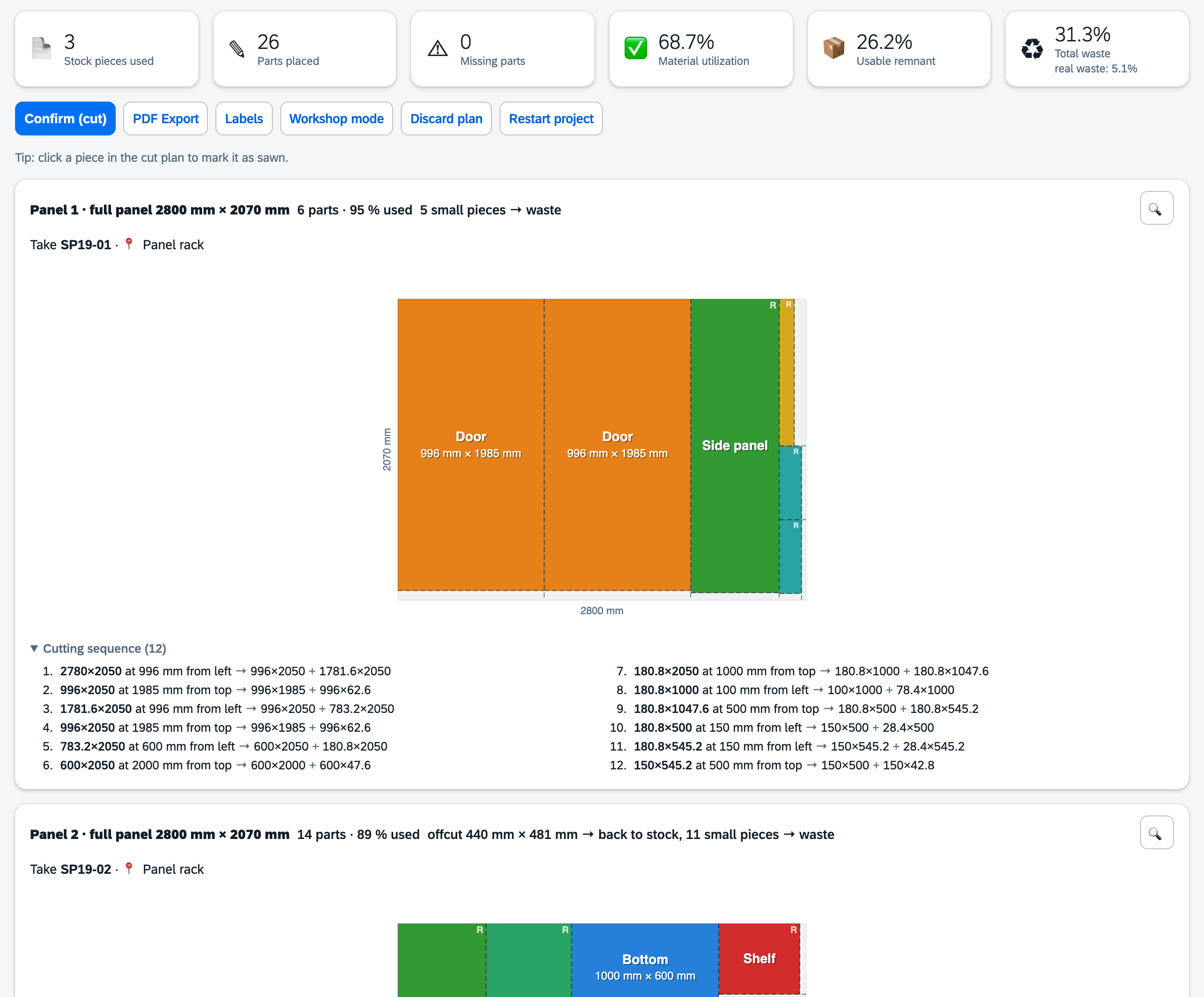
26 parts for a wardrobe, spread over 2800 × 2070 mm chipboard panels? CutStock calculates the cutting plan in seconds – color-coded, with a numbered cut sequence to follow at the saw.
- Saw blade width, edge trim and grain taken into account
- Guillotine cuts: every cut runs from edge to edge
- Offcuts stay clean rectangles
Cutting bars to length
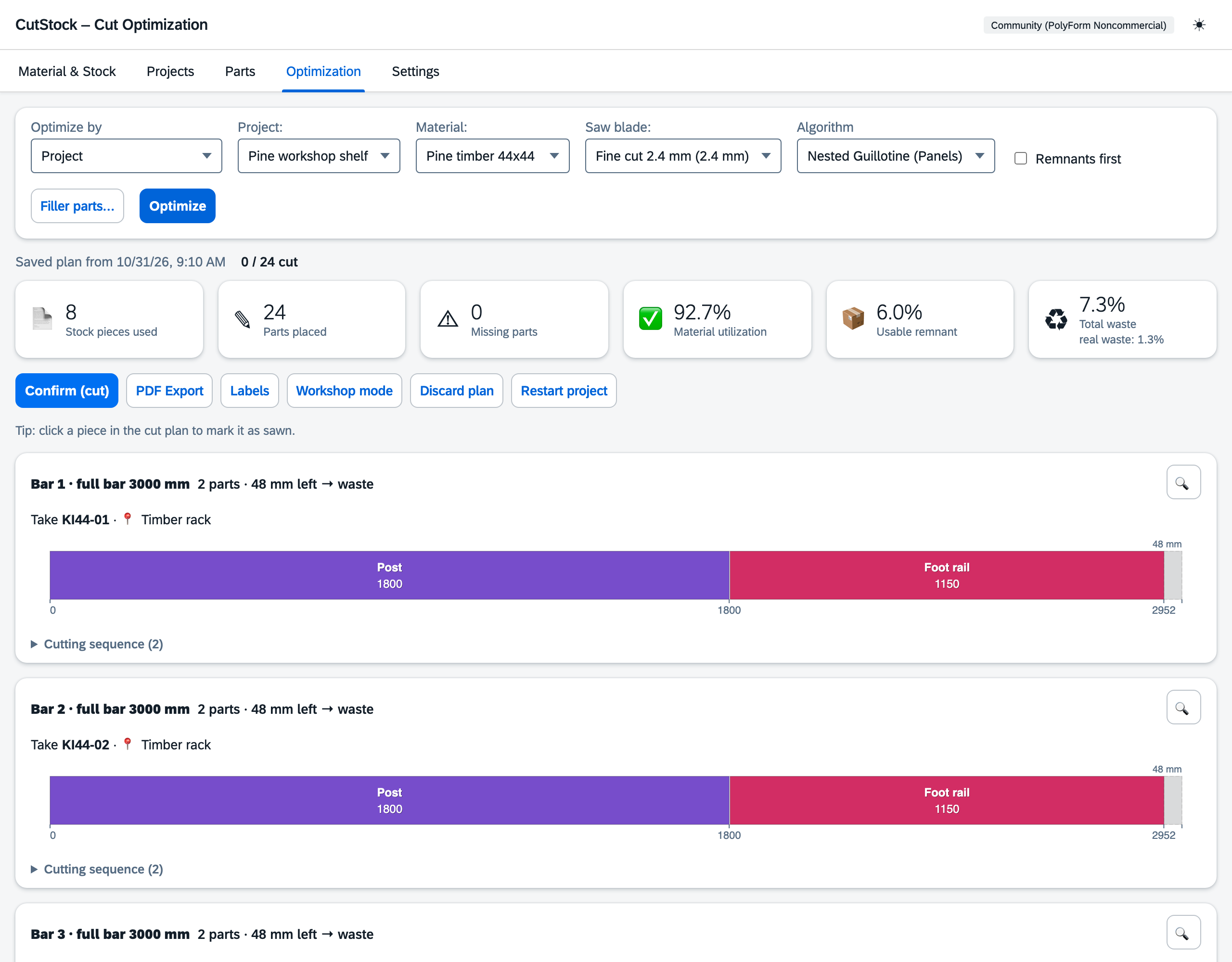
Battens, beams, tubes, aluminium profiles: CutStock solves the split exactly as an integer optimization problem – so as few bars as possible get cut into.
- Up to 99 % yield per bar
- Every offcut is marked: back to stock, into the offcut bin or discard
- Plans stay saved, even when you switch projects
Always know what is where
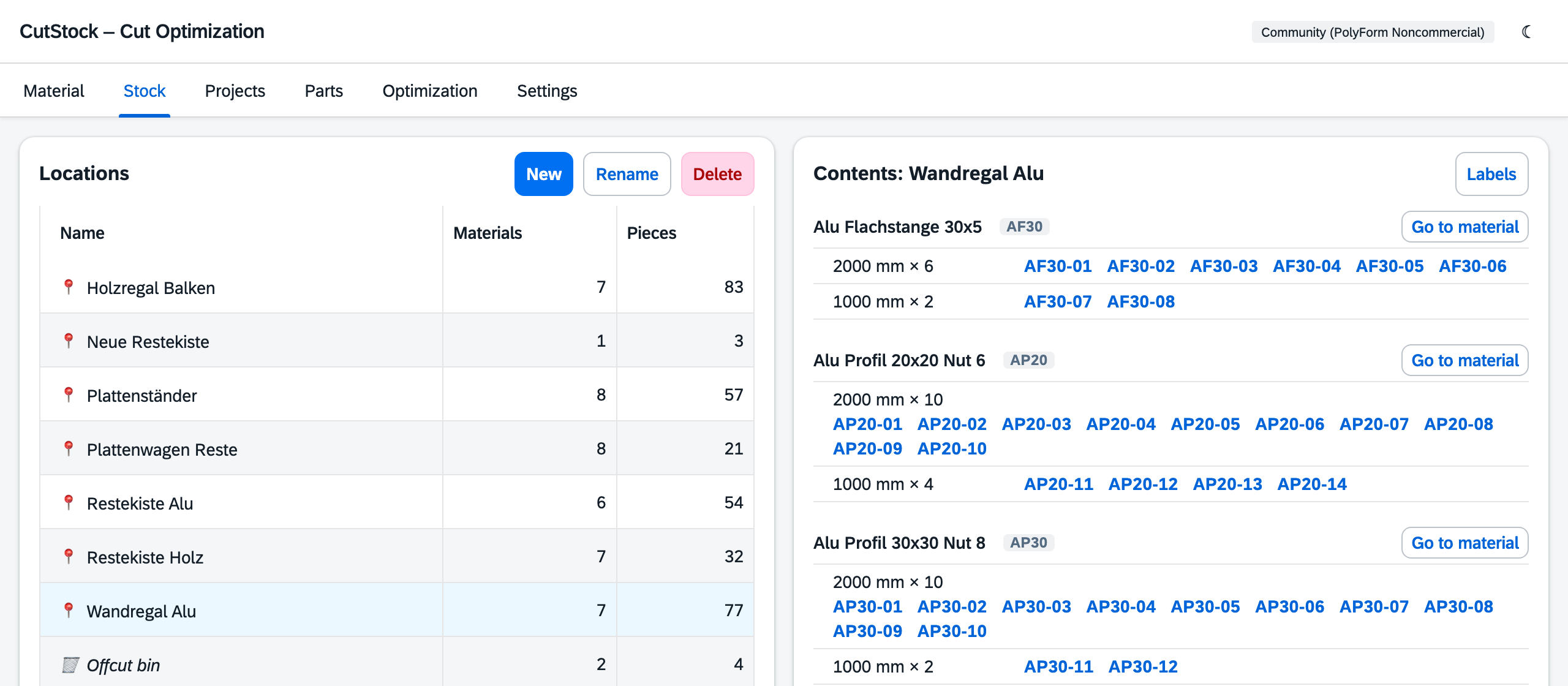
Every piece carries a code like AP40-07, every material has its location. The plan says “Take AP40-07 · wall rack”; while you cut, CutStock books the piece out and the offcuts back in.
- Manage locations and see what is stored there
- Offcut bin for small pieces – for an overview
- Labels per piece or for a whole rack
Tablet at the saw, start cutting
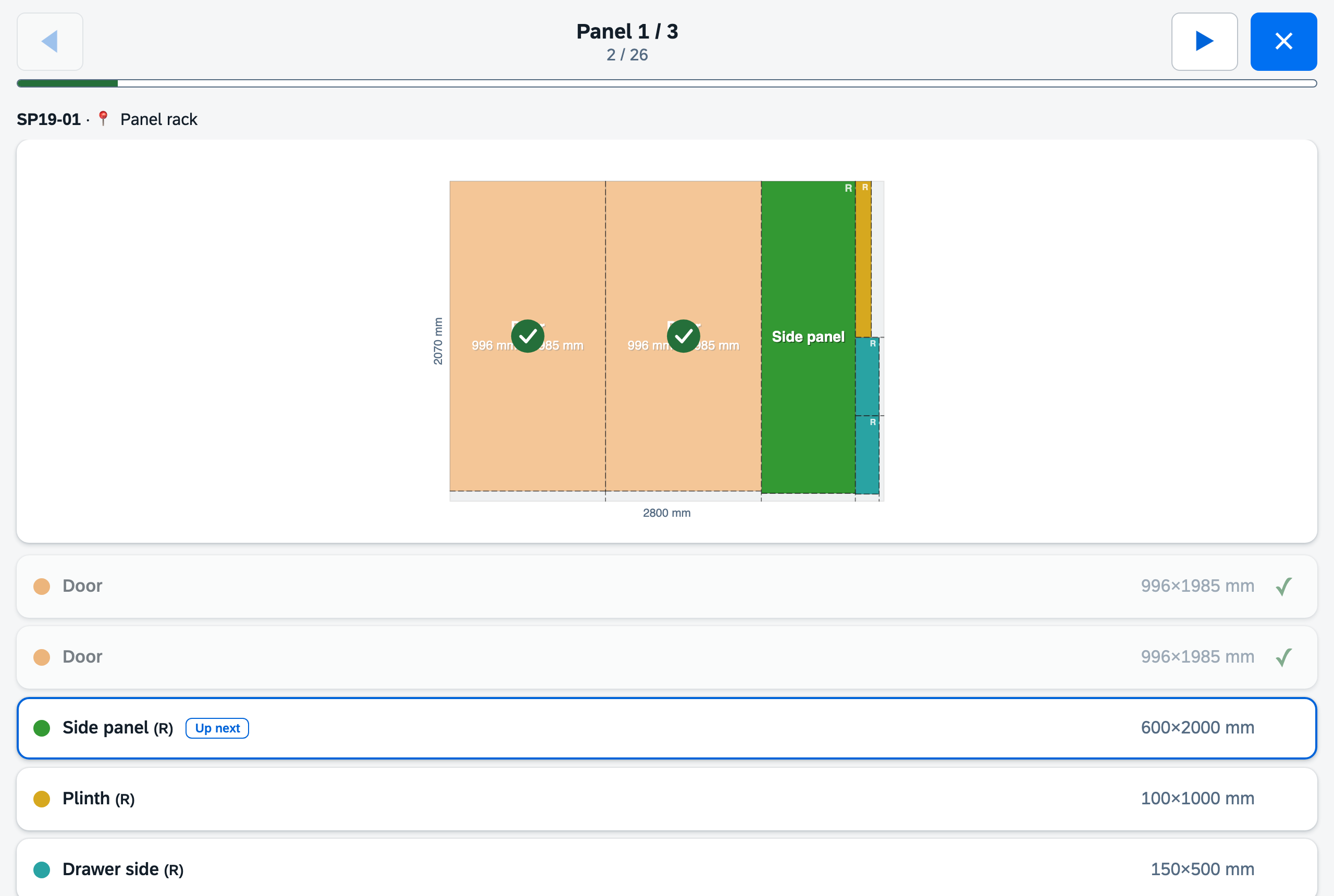
Workshop mode: full screen, large touch targets, tick off one part after another. Every tick updates progress and stock – new offcuts can be printed as a label right away.

Filling offcuts
If a bar or panel leaves waste, CutStock fills it with parts from other projects – for example stool legs you will need soon anyway. It never uses more material.
Several projects, one plan
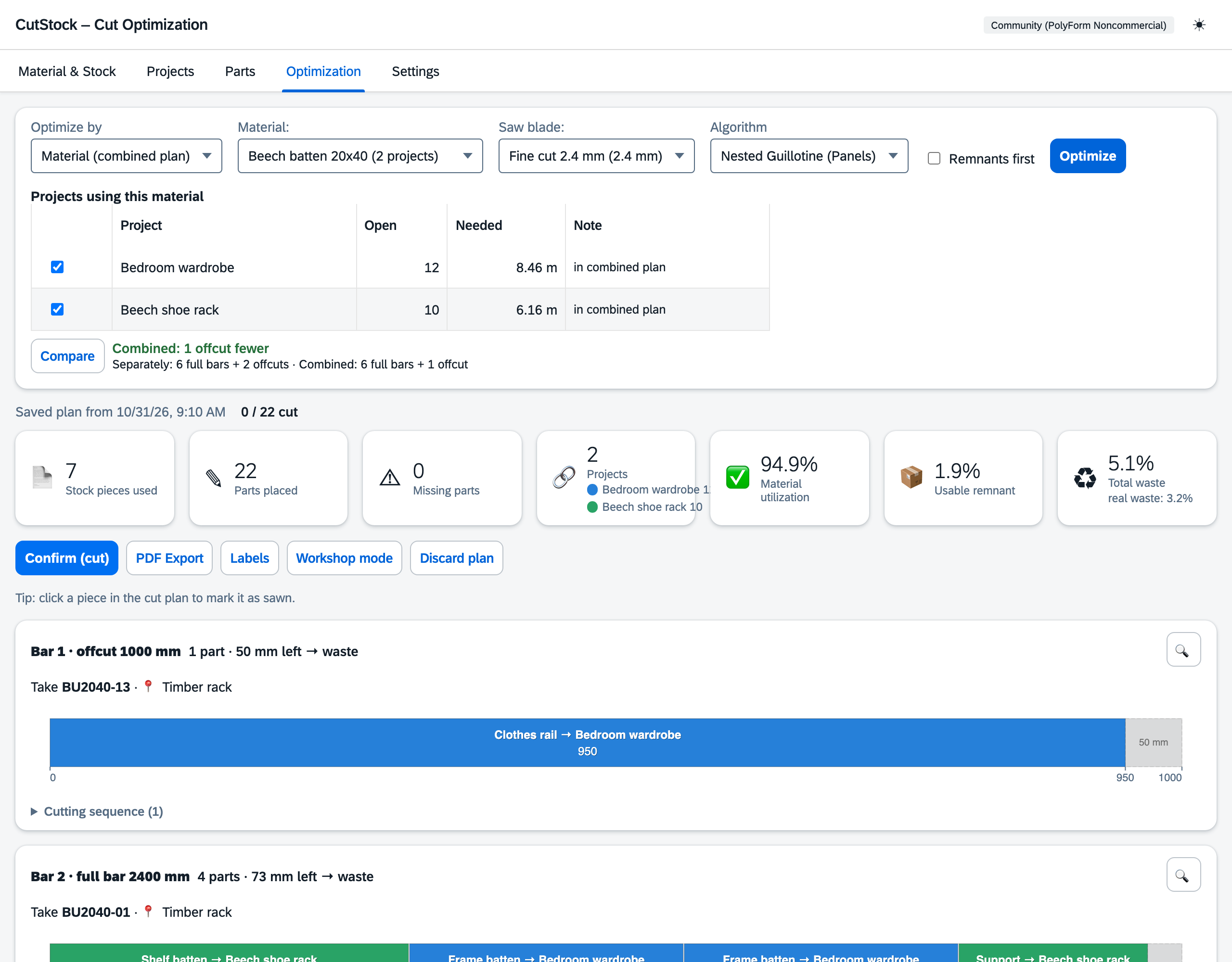
If two projects need the same battens, CutStock plans them together. “Compare” shows beforehand how much that saves; each project gets its own color.
Everything a workshop needs
Up to 95 % yield
Fast, Nested Guillotine or Thorough (genetic algorithm). Bars solved exactly via ILP.
Grain direction
Per material and part – lengthwise, crosswise or any.
Avoid defects
Record knots and cracks – the optimizer plans around them.
Cut sequence
Numbered steps per panel, exact to the saw blade width.
PDF export
Parts list, cut sequence and material requirements – print it and pin it to the saw.
Labels
A4 sheets (Avery 3475/L7160) or Dymo/Brother label printers.
Shopping list
Not enough stock? CutStock shows what is missing – one click books it into stock.
Build several
10 shelves instead of one: set the quantity on the project, everything is optimized together.
Cut lists
Combine parts from any projects and cut them as a list of their own.
CSV import
Parts lists from Excel & co. – separators and columns are detected.
Keyboard shortcuts
Fully usable by keyboard, keys freely assignable.
REST API
Every function via API – for scripts, scanners and machines.
Everywhere in the workshop
Install it on a NAS, home server or Raspberry Pi – then CutStock is reachable from every device on your home network: tablet at the saw, laptop for planning, all in sync. All assets are bundled in the image, no internet is needed at runtime.
docker compose up -d – then CutStock runs at http://localhost:8420.
services:
  cutstock:
    image: ghcr.io/orohde/cutstock:latest
    container_name: cutstock
    restart: unless-stopped
    ports:
      - "8420:8000"
    volumes:
      - ./data:/data
    environment:
      - CUTSTOCK_DB=/data/cutstock.db
Cuttable with any saw
Every cut runs completely from edge to edge. That works with a table saw or circular saw, and the offcuts stay clean rectangles you can store and reuse.
| Method | Yield | Offcuts | Tool |
|---|---|---|---|
| Guillotine (CutStock) | ~85–95 % | always rectangular | table saw, circular saw |
| Free cut | ~93–98 % | L- and T-shaped | CNC router required |
Explained tab by tab
Free for personal use. Fair for businesses.
Source code openly available, licensed under PolyForm Noncommercial 1.0.0.
Desktop app
- macOS and Windows
- Double-click – opens in your browser, but runs completely locally on your computer
- No internet, no cloud, your data stays with you (sync between Macs via iCloud)
Web app (Docker)
- NAS, home server, Raspberry Pi
- Reachable from every device on the network
- amd64 and arm64
Business
- Cabinetmakers, joiners, workshops
- Commercial use permitted
- Quote by e-mail
Why in the browser? The desktop app starts CutStock on your own computer and shows the interface in your default browser – like a web page that only exists on your computer. Nothing goes to the internet, the data stays local.
Note: the desktop builds are not code-signed. macOS: right-click → Open. Windows: “More info” → “Run anyway”.
Ready for less waste?
Download CutStock, enter parts, optimize. Your first cutting plan in five minutes.